How to Close Stablecoin Invoices in Xero
How to Close Stablecoin Invoices in Xero With and Without a Clearing Account Using a Subledger


Umar Mallam Hassam
Use AI to summarize this article
gm accountants 👋
If your business uses stablecoins to pay or get paid in crypto, you know the struggle of reconciling transactions from the block explorer into your accounting software.
Most businesses would default to using a Clearing account, a temporary account, before the transaction is matched to its appropriate invoice (accounts receivable) or bill (accounts payable).
Some subledgers like Breezing or TRES offer the option of closing the stablecoin invoice directly from their product, which negates the use of a clearing account.
In this tutorial, you will learn how to close invoices in stablecoins in Xero using a clearing account and without using a clearing account.
This article is helpful under the following assumptions;
- You’re using a crypto subledger, and in our example, we’re using Breezing. (Listed in our tools directory)
- You’re getting paid into a self custodial wallet (not a neobank or a crypto exchange)
Why Closing Stablecoin Invoices Is Tricky in Xero
Let’s compare using a bank account for fiat first.
If your bank account has an integration with Xero, and you’d connect through the bank feed, Xero would pull in bank statement lines on a recurring basis (e.g. daily). These transactions (income and expenses) would show up for you to match/reconcile in Xero.
But when you’re using stablecoins, transactions come in from the blockchain (or the block explorer) and hence you can forget the bank feed option.
Instead you can export the block explorer transactions by csv, clean it up before importing into your Xero account. But that’s a daunting option if your wallet address holds other volatile tokens, where realized gain/loss would need to be calculated on trades.
The better option is to use a subledger, the tool that sits in between the blockchain and your Xero. A subledger would extract all the stablecoin transactions which you would then categorize before subsequently syncing into Xero.
Since Xero does not accommodate for stablecoins (eg. USDC and USDT), the invoices and bills would be created in USD.
USDC and USDT trade extremely close to $1, but rarely exactly $1. So when a $2,000 invoice gets paid, you might receive $1,998 or $2,001.31 worth of stablecoin instead. Those differences would need to be subsequently cleared manually.
Method 1: Closing a stablecoin invoice in Xero using a clearing account
A clearing account is a temporary account before the transaction is matched to its appropriate invoice (accounts receivable) or bill (accounts payable).
This step is required for subledgers that do not offer an option to close stablecoin invoices within their product.
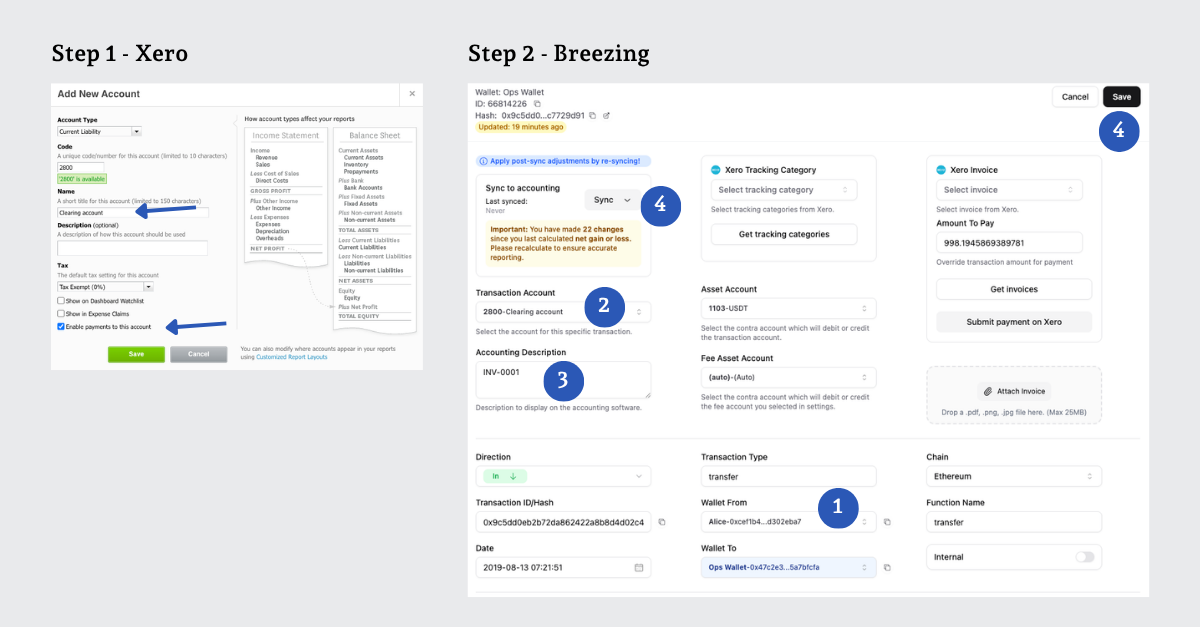
Step 1: Set up the clearing account in Xero
In Xero, go to Accounting > Chart of Accounts and add a Clearing Account (Account Type: Current Liability).
Make sure you ‘enable payments to this account’, otherwise Xero won't let you apply a payment against it later.
Step 2: Sync the payment in Breezing
For this example, we’re recording an incoming payment of USDT 1,000 from Alice. The corresponding invoice of USD 1,000 has also been created in Xero.
In Breezing, the subledger, perform the following;
- Find the incoming transaction and select Alice's contact (already labeled).
- Under Transaction Account, select Clearing Account.
- Add Alice's invoice number for reference.
- Click Save, then Sync to Xero.
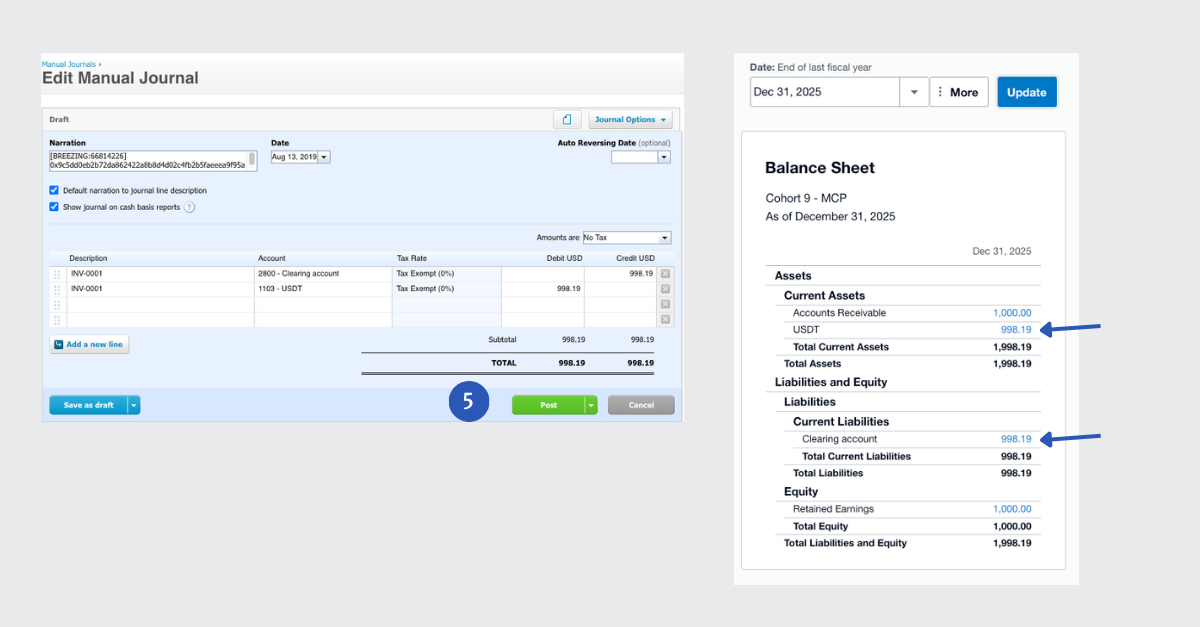
This creates a journal entry in Xero crediting the clearing account and debiting your USDT account:
Dr USDT 998.19
Cr Clearing Account 998.19
You can also see these 2 accounts in your balance sheet prior to applying the payment against the invoice.
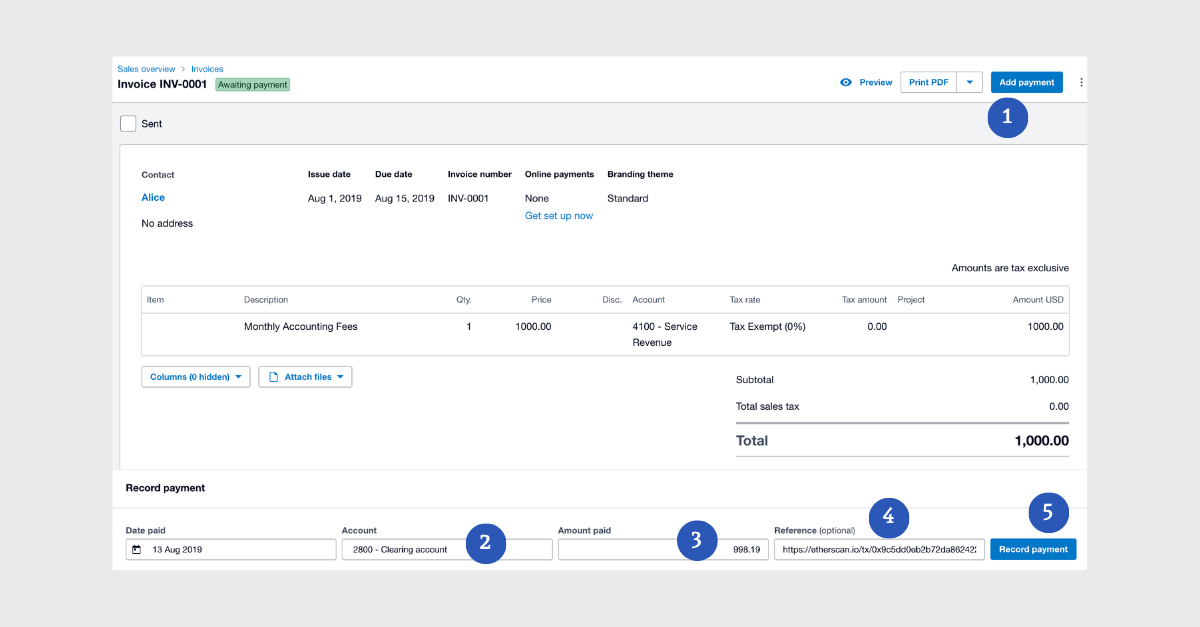
Step 3: Apply the payment to the invoice
In Xero, perform the following;
- Go to Alice's invoice and click Add Payment
- Under Account, select the Clearing Account as the paying account
- Enter the actual amount received (In our example, this was $998.19 and not the invoice's $1,000), and the payment date
- Add the transaction hash as your reference
- Click Record Payment.
The accounting entries are:
Dr Clearing Account 998.19
Cr Accounts Receivable 998.19
The invoice is now mostly closed, with a small $1.81 balance remaining.
The simplest fix is to allocate that residual amount to an existing expense account, such as Net Realized Gain/Loss (make sure payments are enabled for that account too).
Method 2: Closing a stablecoin invoice in Xero without a clearing account
For this option, your crypto subledger needs to have the feature where it can pull open invoices directly from Xero and sync the payment to Xero. (For example in TRES & Breezing)
For this second example, we’re recording an incoming payment for USDC 1,000 from Bob. Again the corresponding invoice of USD 1,000 has been created in Xero.
Follow the steps below:
- In Breezing, find Bob's transaction (contact already labeled).
- Click Get Invoices to pull open invoices directly from Xero.
- Choose Bob’s invoice for USD 1,000
- Add Bob's invoice number for reference.
- The fiat equivalent of USDC 1,000 was USD 999.87, but in Breezing you can overwrite to USD 1,000, so you can avoid manually subsequently clearing the pegging differences.
- Submit invoice for payment.
- Save and sync to Xero.
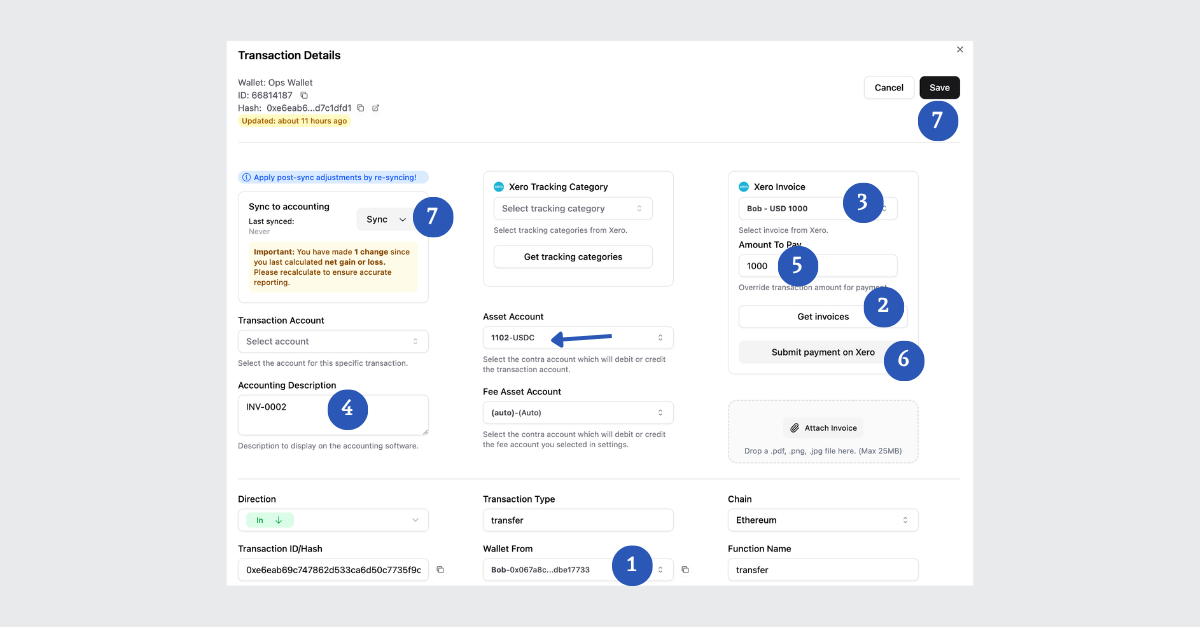
Breezing applies the payment directly to the Xero invoice, no clearing account involved.
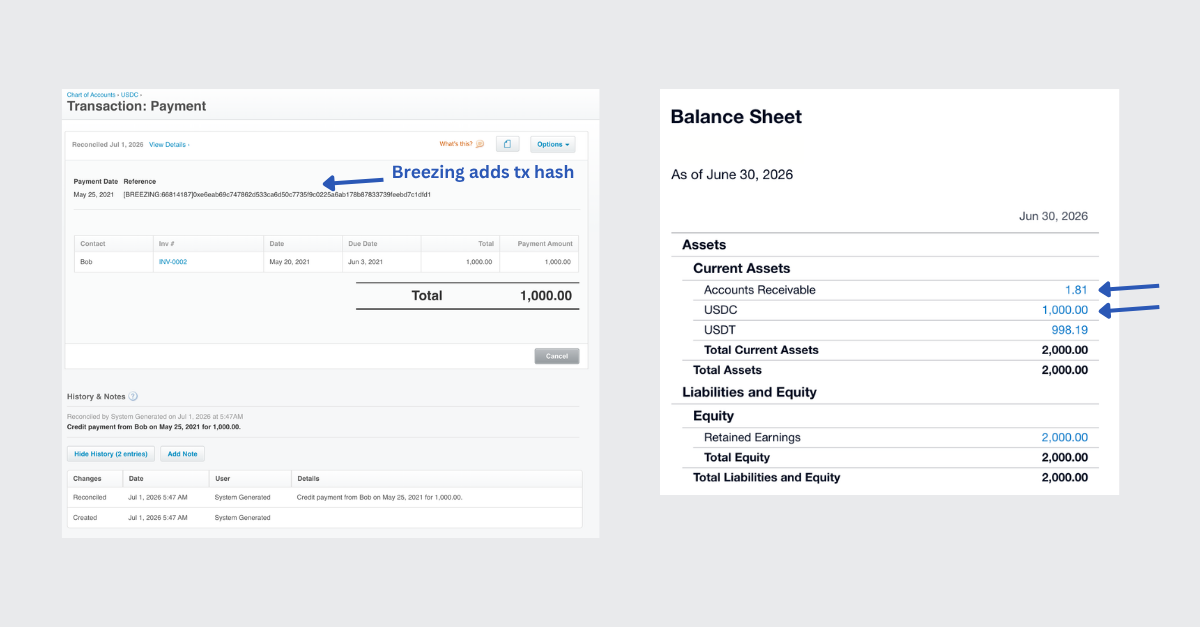
The resulting journal debits the USDC account and credits Accounts Receivable directly, in one step:
Dr USDC 1,000
Cr Accounts Receivable 1,000
As noted below, Breezing automatically adds the transaction hash in Xero for reference. Our balance sheet also shows receipt of USDC 1,000 and clearing of Accounts Receivable.
Get Started Today
Skipping the clearing account is faster and means fewer manual steps, but it depends entirely on your subledger supporting direct invoice sync with Xero (or QuickBooks). It's worth checking whether your current subledger supports this feature yet.
If you haven't set up a subledger and Xero integration at all yet, start with our walkthrough on automating crypto bookkeeping using a crypto subledger and Xero, which covers chart of accounts setup, wallet syncing, and automation rules in more depth.
That's it folks, you now know two ways to close out stablecoin invoices in Xero with and without a clearing account.
I'd love to hear which approach you're using, and whether your subledger of choice has shipped a similar direct-sync feature yet.
Umar is a Chartered Accountant who spent years as an external auditor at Deloitte and BDO before following his curiosity into the world of digital assets.
Today, he's the Founder of OCF Institute and Host of The Accountant Quits podcast, where he helps finance professionals make sense of onchain accounting and finance, and discover the career opportunities opening up inside companies working with digital assets.
Through in-person events and an online community, Umar also brings together the established voices and rising talent shaping the future of web3 finance.
.png)